



Skip to content

Intelligence Layer

One account, one ledger, one agent layer. The modules are what you switch on.

Platform overview
The AI Intelligence Layer

One intelligence layer under every module: the same data, the same agents, the same ledger, whichever function you switch on.

  • One layer, every module
  • Shared data and agents
  • Every run on one ledger
Go to The AI Intelligence Layer
Isometric stack of pale grey slabs wired together on white, with one layer filled deep cyanStart hereThe architecture is the argumentWhy adding the sixth module costs a fraction of buying the first.Read the architecture
The Architecture

One account carries every brand you run. Modules are switched on per brand, and every run lands in the same ledger.

  • One account, many brands
  • Modules toggle per brand
  • A single billing ledger
Go to The Architecture
Isometric stack of pale grey slabs wired together on white, with one layer filled deep cyanStart hereThe architecture is the argumentWhy adding the sixth module costs a fraction of buying the first.Read the architecture
The agent layer

Three kinds of agent. Watchers notice, drafters produce, and Ask Intelligence answers from your own numbers.

  • Watchers run on a schedule
  • Drafters wait for sign-off
  • Answers carry their source
Go to The agent layer
Isometric stack of pale grey slabs wired together on white, with one layer filled deep cyanStart hereThe architecture is the argumentWhy adding the sixth module costs a fraction of buying the first.Read the architecture
Security

Isolated tenancy, roles that mean something, and a plain answer about what leaves your account.

  • Per-tenant isolation
  • Roles down to the module
  • Stated data boundaries
Go to Security
Isometric stack of pale grey slabs wired together on white, with one layer filled deep cyanStart hereThe architecture is the argumentWhy adding the sixth module costs a fraction of buying the first.Read the architecture

Seats are free — you pay for what the AI runs

Book a demoOpen your account

Capabilities

The AI you work with directly, and the modules it already runs. Take one, or take them all.

See all modules

AI Assistance

Work with the AI directly

Ask Intelligence

Ask a business question in plain words. It reads your own data through read-only tools scoped to the brand, and answers with the real figure or says the data is not there.

  • Fifteen read-only tools
  • Scope enforced in code
  • Never invents a number
Go to Ask Intelligence
Playground

A direct chat with the models your administrator allows. No brand data: the model sees the conversation, your files and your instructions.

  • Compare three models side by side
  • Files in, documents out
  • The price under every answer
Go to Playground
Agents

Three kinds of agent do the standing work: watchers notice, drafters produce, and nothing ships until someone with the role signs.

  • Watchers run on a schedule
  • Drafters wait for sign-off
  • Every run lands on the ledger
Go to Agents
Skills

How a brief is built, how a campaign is structured, what a decent article looks like — the craft of the people who built this, shipped as the default setting.

  • Senior practice built in
  • Defaults you adjust
  • Nothing to write from scratch
Go to Skills

Modules & Features

The functions it runs

Business Intelligence

Ask your business a question in plain words and get the real number back, with the source that produced it.

  • Plain-language questions
  • Every figure sourced
  • Board-ready reporting
Go to Business Intelligence
Project Management

The board where an insight becomes a card with an owner, instead of a dead report nobody actions.

  • Kanban with a timeline
  • One click, insight to task
  • Owner and date attached
Go to Project Management
Sales

Pipeline that drafts its own paperwork, and flags the deals that went quiet before you notice.

  • Quotes off the deal record
  • Quiet deals surfaced
  • Revenue projected forward
Go to Sales
Brand Marketing

The content engine and the Creative Studio behind the brand: articles buyers actually search for, and the images and video that carry them.

  • Eight-stage content engine
  • Creative Studio built in
  • Drafts wait for sign-off
Go to Brand Marketing
Social

Posts drafted from work you have already approved — an article becomes the thread, a launch becomes the post — on a calendar you sign.

  • Drafts from approved work
  • A calendar you sign
  • One voice on every network
Go to Social
Search

Watches where you rank, ties every position to the page that earned it, and says what to write next — with GEO watching the AI assistants.

  • Rank tracked continuously
  • Positions tied to pages
  • GEO polls the assistants
Go to Search
Ads

Search campaigns arrive built — ad groups, keywords, copy — priced before they run, and paused the moment they stop earning.

  • Campaigns priced first
  • Ad groups arrive built
  • Paused when they slip
Go to Ads
Customer Service

Answers from what you gave it, on your own page, and it says so plainly when it does not know.

  • Grounded in your content
  • Refuses to invent
  • Escalates to a human
Go to Customer Service
IT Support

The support desk turned inward: employees ask, it answers from your own systems and documentation, and escalates what it cannot resolve.

  • Answers from your docs
  • Tickets triaged first
  • Escalates to a human
Go to IT Support

Seats are free — you pay for what the AI runs

Book a demoOpen your account

Services

The people around the product, from the first connection to a named operator on your account.

All services
Onboarding

A guided session to connect your data and switch on the first function, then a first week planned day by day.

  • One guided session
  • First function live in a week
  • A person on the other end
Go to Onboarding
A fanned stack of white ruled sheets with the top one edged in deep cyanLarger organizationsRoll out by brand, by team, by functionOne account, one ledger, roles down to the function. Staged so procurement never has to open a file.See the group rollout
Data integration

We connect the systems you already run and prepare the data behind them, so every answer has a source.

  • Connectors built and tested
  • Metrics defined once
  • Sources reconciled
Go to Data integration
A fanned stack of white ruled sheets with the top one edged in deep cyanLarger organizationsRoll out by brand, by team, by functionOne account, one ledger, roles down to the function. Staged so procurement never has to open a file.See the group rollout
Intelligence audit

A fixed-price review of where you rank, what the AI assistants answer, and which function pays back first.

  • Four assistants polled
  • Search position by market
  • A ranked starting point
Go to Intelligence audit
A fanned stack of white ruled sheets with the top one edged in deep cyanLarger organizationsRoll out by brand, by team, by functionOne account, one ledger, roles down to the function. Staged so procurement never has to open a file.See the group rollout
Training

Sessions for the people who will approve, review and ask, so the workforce is used rather than watched.

  • By role, not by feature
  • Live on your account
  • Recorded for the next hire
Go to Training
A fanned stack of white ruled sheets with the top one edged in deep cyanLarger organizationsRoll out by brand, by team, by functionOne account, one ledger, roles down to the function. Staged so procurement never has to open a file.See the group rollout
Managed operations

Someone reviews what the watchers found, approves the drafts within your caps, and runs the weekly review.

  • Drafts approved in your name
  • Caps respected
  • Weekly review delivered
Go to Managed operations
A fanned stack of white ruled sheets with the top one edged in deep cyanLarger organizationsRoll out by brand, by team, by functionOne account, one ledger, roles down to the function. Staged so procurement never has to open a file.See the group rollout
Custom features

An agent or a function built for your process, on the same ledger and under the same approval gates.

  • Scoped before it is priced
  • Same gates, same ledger
  • Yours to keep
Go to Custom features
A fanned stack of white ruled sheets with the top one edged in deep cyanLarger organizationsRoll out by brand, by team, by functionOne account, one ledger, roles down to the function. Staged so procurement never has to open a file.See the group rollout
Dedicated hosting

A single-tenant deployment in the region you choose, with the data boundary written down and an uptime commitment.

  • Single tenant
  • Region of your choice
  • Uptime in writing
Go to Dedicated hosting
A fanned stack of white ruled sheets with the top one edged in deep cyanLarger organizationsRoll out by brand, by team, by functionOne account, one ledger, roles down to the function. Staged so procurement never has to open a file.See the group rollout
Premium Support

A named contact, committed response times, and a quarterly review of what ran, what it cost and what to change.

  • Named contact
  • Committed response times
  • Quarterly review
Go to Premium Support
A fanned stack of white ruled sheets with the top one edged in deep cyanLarger organizationsRoll out by brand, by team, by functionOne account, one ledger, roles down to the function. Staged so procurement never has to open a file.See the group rollout

Seats are free — you pay for what the AI runs

Book a demoOpen your account

About

Why this was built, who is behind it, what it has done for the companies running it, and how to run it well.

About BearingBridge
Why we built it?

What a company can do has been capped by who it could afford to hire. That cap is the thing that moved.

  • Capability, not headcount
  • Written, not benchmarked
  • No lock-in claim
Go to Why we built it?
A row of pale grey blocks climbing steeply to a single tall deep cyan block, a hairline curve tracing the riseThe short versionPunch above your headcountThe AI workforce for companies that need more capability than they can staff.Read the argument
Who is behind BearingBridge?

Who built this, what it is independent of, and why that independence is worth stating out loud.

  • Model-independent
  • No data resale
  • Named people behind it
Go to Who is behind BearingBridge?
A row of pale grey blocks climbing steeply to a single tall deep cyan block, a hairline curve tracing the riseThe short versionPunch above your headcountThe AI workforce for companies that need more capability than they can staff.Read the argument
How we run the work

The six-phase method every account is built on: a written bearing, a dated baseline, a pilot on real data, and a fix that reconciles the money.

  • A kill criterion, in writing
  • Costs watched as they run
  • An ending without us
Go to How we run the work
A row of pale grey blocks climbing steeply to a single tall deep cyan block, a hairline curve tracing the riseThe short versionPunch above your headcountThe AI workforce for companies that need more capability than they can staff.Read the argument
Case studies

Ten builds told the way they ran: the situation, what was built, what changed months later, and what got switched off.

  • Sector and function stated
  • Client-verified figures
  • The stopped work left in
Go to Case studies
A row of pale grey blocks climbing steeply to a single tall deep cyan block, a hairline curve tracing the riseThe short versionPunch above your headcountThe AI workforce for companies that need more capability than they can staff.Read the argument
FAQ

The questions that come up before every demo, answered here so the demo can be about your business.

  • Product and billing
  • Security and data
  • Answered in plain words
Go to FAQ
A row of pale grey blocks climbing steeply to a single tall deep cyan block, a hairline curve tracing the riseThe short versionPunch above your headcountThe AI workforce for companies that need more capability than they can staff.Read the argument
Testimonials

Customers on the module they actually run, quoted directly, with the module named.

  • Module named each time
  • Quoted, not paraphrased
  • Role and size given
Go to Testimonials
A row of pale grey blocks climbing steeply to a single tall deep cyan block, a hairline curve tracing the riseThe short versionPunch above your headcountThe AI workforce for companies that need more capability than they can staff.Read the argument
Changelog

What shipped, dated, newest first. The place to check whether the thing you were promised exists yet.

  • Dated entries
  • Shipped only
  • Linked to the module
Go to Changelog
A row of pale grey blocks climbing steeply to a single tall deep cyan block, a hairline curve tracing the riseThe short versionPunch above your headcountThe AI workforce for companies that need more capability than they can staff.Read the argument
Partner program

Run the platform for the companies you advise. Every client is a brand on your account, billed on its own ledger.

  • Clients as brands
  • Separate ledgers
  • Margin on every run
Go to Partner program
A row of pale grey blocks climbing steeply to a single tall deep cyan block, a hairline curve tracing the riseThe short versionPunch above your headcountThe AI workforce for companies that need more capability than they can staff.Read the argument

Seats are free — you pay for what the AI runs

Book a demoOpen your account

Pricing

Seats are free. You pay for what the AI actually runs, and you see the price first.

Full pricing
How it works

Three sentences, and that is the whole model. No tiers to decode, no per-seat arithmetic to do.

  • No seat licence
  • No annual lock-in
  • Three sentences long
Go to How it works
Ten pale meter tracks filled to different levels in deep cyan, cut by one horizontal cyan limit lineNo surprisesYou see the price before you run itThe price, the caps and the gates, all visible before anything spends.Open pricing
Seats

Give an account to everyone who needs one. The number on the invoice does not move when you do.

  • Unlimited accounts
  • Zero per-seat cost
  • Roles still enforced
Go to Seats
Ten pale meter tracks filled to different levels in deep cyan, cut by one horizontal cyan limit lineNo surprisesYou see the price before you run itThe price, the caps and the gates, all visible before anything spends.Open pricing
What things cost

Every run is priced from your wallet before or as it runs, and the machine’s own mistakes are not billed to you.

  • Quoted before it runs
  • Retries are on us
  • Itemised in the ledger
Go to What things cost
Ten pale meter tracks filled to different levels in deep cyan, cut by one horizontal cyan limit lineNo surprisesYou see the price before you run itThe price, the caps and the gates, all visible before anything spends.Open pricing
Caps and gates

A hard cap per module, and an approval gate in front of anything that publishes or spends.

  • Hard cap per module
  • Approval before publish
  • A zero balance stops the AI
Go to Caps and gates
Ten pale meter tracks filled to different levels in deep cyan, cut by one horizontal cyan limit lineNo surprisesYou see the price before you run itThe price, the caps and the gates, all visible before anything spends.Open pricing
Questions

The questions people actually ask about the bill, answered on the page rather than in a call.

  • Overage answered
  • Cancellation answered
  • Migration answered
Go to Questions
Ten pale meter tracks filled to different levels in deep cyan, cut by one horizontal cyan limit lineNo surprisesYou see the price before you run itThe price, the caps and the gates, all visible before anything spends.Open pricing

Seats are free — you pay for what the AI runs

Book a demoOpen your account

Insights

Three collections, one standard: long-form, sourced, dated, and never behind a form.

All insights
AI Trends

What is moving under the industry: model economics, the Chinese price tier, and how buyers now ask assistants instead of searching.

  • The model market, read closely
  • AI search and citations
  • Every claim sourced and dated
Go to AI Trends
A fanned stack of white ruled sheets with the top one edged in deep cyanThe standardLong-form, sourced, never gatedEach piece answers the question in its title completely, carries its date, and sits behind no form.Open the library
Best Practices — AI Guide

The working guide: when to buy and when to build, when an agent is the wrong tool, and what survives contact with production.

  • Build-or-buy, decided
  • Architectures that ship
  • Prompts that do real work
Go to Best Practices — AI Guide
A fanned stack of white ruled sheets with the top one edged in deep cyanThe standardLong-form, sourced, never gatedEach piece answers the question in its title completely, carries its date, and sits behind no form.Open the library
CEO's Opinion

Signed columns from the person running the company: what building agents across six functions actually shows, ahead of the industry line.

  • Signed, never ghostwritten
  • From live builds, not decks
  • Positions, not press releases
Go to CEO's Opinion
A fanned stack of white ruled sheets with the top one edged in deep cyanThe standardLong-form, sourced, never gatedEach piece answers the question in its title completely, carries its date, and sits behind no form.Open the library

Seats are free — you pay for what the AI runs

Book a demoOpen your account

Insights/Best Practices — AI Guide/Method

12 NotebookLM prompts that do real work.

Most people give NotebookLM lazy prompts and get book reports back. Here are twelve our team uses that pull real work out of it instead.

BearingBridgeJune 20269 min read

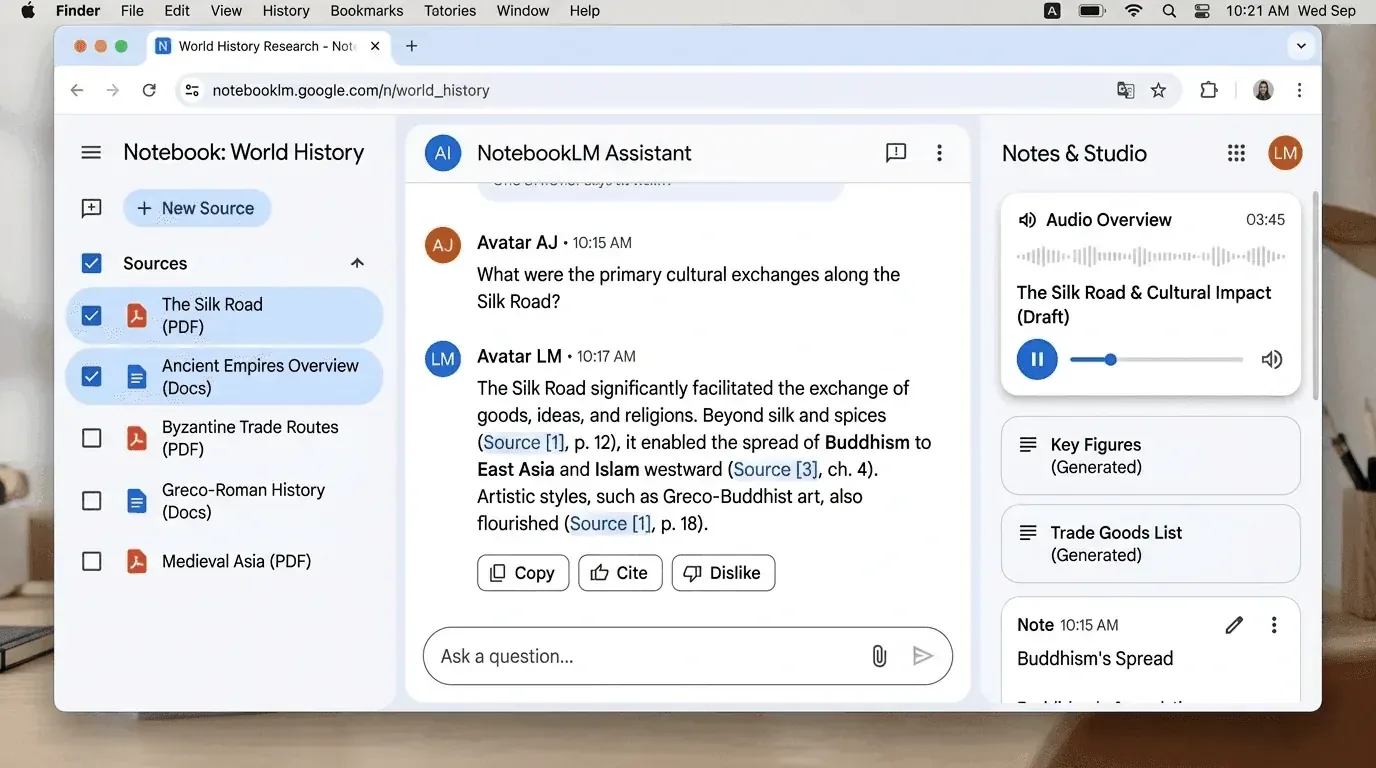
Screenshot of Google NotebookLM at work: a sources panel, a cited chat answer, and the Studio audio-overview panel
On this sheet

Google’s NotebookLM reads the documents you give it and answers questions grounded in them, builds summaries, and can even turn a stack of files into an audio discussion. The free tier covers most of what a student or casual researcher needs, with paid plans bundled into Google’s AI subscriptions starting at $7.99 a month for heavier use.

NotebookLM Plus comes bundled with Google AI Plus at $7.99 a month, roughly doubling the free tier’s limits, according to coverage of Google’s 2026 pricing.

What separates a useful session from a forgettable one usually isn’t the documents. It’s the prompt. Ask lazily and you get a competent book report. Ask well and the thing starts behaving like a tutor, or an analyst, or an editor who doesn’t care about your feelings. These are twelve we keep coming back to. Each bracketed line is a placeholder you fill in.

Keep it in the language you’re studying

Anyone learning a language has watched NotebookLM start strong in French or Japanese and then quietly drift back to English the second a hard concept shows up. This prompt holds the line. It’s also just handy when you’d rather absorb difficult material in a language you think in more naturally.

Build a back-and-forth discussion from the uploaded sources, spoken start to finish in [TARGET LANGUAGE]. Hold that language even through the hard parts. Reach for English only when a technical term has no clean equivalent, and say so when you do. Keep it loose, the way two people actually talk on a podcast.

We lean on it most for foreign-language research papers, where the distance between textbook vocabulary and how experts actually write can be wide enough to trip you up.

Get to the decision

Picture opening a forty-page report at nine in the morning and needing to act on it before lunch. That’s what this one is for. Rather than handing back a summary, it digs out the parts that change what you do: where people are actually struggling, what’s going to get in the way, and what the document conveniently left out.

Read the uploaded files like you're prepping a brief for an executive who has ten minutes. Skip the warm-up. Give me three short lists. First, what real users are struggling with, with direct quotes. Second, what could block us, whether that's money, staffing, or technical limits. Third, what's missing that should worry us. If my goal isn't clear, stop and ask instead of guessing.

That last instruction does more than it looks like. Leave it off and the tool will cheerfully pick a focus you never asked for and run with it.

Make it teach a seventh grader

There’s an old test for whether you really understand something: try explaining it to a twelve-year-old without losing the substance. This prompt puts NotebookLM through that test, and the gaps it exposes are often your own.

Explain the uploaded material to a sharp twelve-year-old. Keep the sentences short and assume no background. For each piece, give a one-line plain version, a comparison to something from everyday life, and three difficult words spelled out simply. When a section gets thick, turn it into a quick true-or-false quiz.

It reads like a study trick for kids, and that’s underselling it. We use it to find out whether we actually grasp a subject before we write a word about it.

Work out why it flopped

Some attempts just miss the mark, and sitting around guessing why tends to waste an afternoon. Here NotebookLM plays the blunt reviewer. You hand it what you did and the material you were supposed to be working from, and it shows you where the two parted ways. No pep talk. Just the gaps, quoted back at you.

Something I tried didn't work and I want to know where it went wrong. Compare what I did against the uploaded sources. Here's the setup. What I tried: [WHAT]. The steps I took: [STEPS]. How it turned out: [RESULT]. What I expected instead: [EXPECTATION]. Show me the steps I skipped, the ideas I missed, and the basics I glossed over, citing the sources as you go. Keep it pointed at next time.

Fair warning, this one can sting, because it pulls the exact line from your source that you didn’t follow and sets it next to what you did. Uncomfortable, and that’s the value.

Find the holes in the argument

Useful when you’re reading something you’re half inclined to agree with. Instead of nodding along, you get the weak joints laid out, which is the fastest way to stop being fooled by a document that simply sounds confident.

Go through the uploaded sources as a skeptical reader. List the main claims, then for each one tell me how well the source actually backs it up: strong evidence, thin evidence, or just asserted. Point out where the logic jumps a step, and flag any claim that would fall apart if one assumption turned out wrong.

We run this on vendor white papers and opinion pieces before quoting either.

Turn it into questions, not answers

A study favorite that flips the usual setup. Rather than feeding you summaries, the tool quizzes you, which forces you to retrieve what you know instead of rereading it for the fourth time and mistaking familiarity for memory.

Using only the uploaded material, write me a set of 15 questions that test whether I understand it, ordered easy to hard. Mix recall questions with ones that make me apply an idea to a new situation. Don't give the answers yet. Wait until I've tried, then grade me and explain what I missed.

Build the timeline

Long documents bury the sequence of events inside paragraphs, and you lose the thread. This one pulls the order back out so you can see how one thing led to the next.

From the uploaded sources, build a chronological timeline of the key events, decisions, or developments. Give each entry a date or rough time marker, a one-line description, and a note on why it mattered. Where the sources disagree on timing or details, say so rather than smoothing it over.

Handy for case files, project histories, and anything where cause and effect got tangled.

Compare two sources side by side

When you’ve uploaded competing reports or two takes on the same subject, the interesting part isn’t either one alone. It’s where they split.

Compare [SOURCE A] and [SOURCE B] from the uploaded material. Lay out where they agree, where they directly contradict each other, and where one covers ground the other ignores entirely. For each disagreement, tell me what each side claims and what evidence they give. Don't pick a winner unless the evidence is genuinely one-sided.

Draft from the source, not from thin air

Writing tools love to invent. This prompt keeps NotebookLM tethered to your actual material, so the draft it hands back is built from what you uploaded rather than whatever sounds plausible.

Using only the uploaded sources, draft a [BLOG POST / EMAIL / SUMMARY] of about [LENGTH] on [TOPIC]. Pull every fact and figure from the material, and mark anything you can't support from the sources so I can check it. Match a plain, direct tone. No filler openings.

The “mark anything you can’t support” line is the safeguard. It turns guesses into something you can see and verify.

Pressure-test a plan

Before you commit to a plan that lives inside a document, it helps to hear the case against it. This prompt makes NotebookLM argue the other side using your own material.

Treat the plan described in the uploaded sources as a proposal you've been asked to poke holes in. Give me the strongest case against it, drawn from the material itself: the risks, the costs, the assumptions that might not hold. Then tell me what would have to be true for the plan to work anyway.

Pull out the action items

Meeting notes and long threads hide the parts that need doing. This one separates the things someone actually has to act on from the surrounding talk.

Read the uploaded notes and pull out everything that's actually an action item: something someone needs to do. For each one, give me the task, who owns it if the source says, and any deadline mentioned. Keep decisions and discussion separate from tasks. If an owner or date is missing, mark it as unassigned rather than guessing.

Explain it three ways

Some ideas don’t land the first way they’re put. This prompt gives you the same concept from three angles, and usually one of them finally clicks.

Take the hardest idea in the uploaded material and explain it to me three different ways: once with a plain definition, once with an analogy from everyday life, and once by walking through a concrete example step by step. Then tell me which of the three you think makes it clearest and why.

Worth keeping in mind

None of these are complicated, and that’s sort of the point. The tool is only ever as good as the question. Pick the prompt that matches the job, upload your material, and you’ll get a lot more than a summary back. Try one on something you’re working on this week and you’ll see the difference fast enough.
Start

Reading about it is the slow way.

Open an account and run one module on one brand, or book a demo and see the platform on your own data.

No subscription. No seat fee. No card required to request an account.