
Skip to content
EN
Log inBook a demoOpen your account

Intelligence Layer

One account, one ledger, one agent layer. The modules are what you switch on.

Platform overview
The AI Intelligence Layer

One intelligence layer under every module: the same data, the same agents, the same ledger, whichever function you switch on.

  • One layer, every module
  • Shared data and agents
  • Every run on one ledger
Go to The AI Intelligence Layer
Isometric stack of pale grey slabs wired together on white, with one layer filled deep cyanStart hereThe architecture is the argumentWhy adding the sixth module costs a fraction of buying the first.Read the architecture
The Architecture

One account carries every brand you run. Modules are switched on per brand, and every run lands in the same ledger.

  • One account, many brands
  • Modules toggle per brand
  • A single billing ledger
Go to The Architecture
Isometric stack of pale grey slabs wired together on white, with one layer filled deep cyanStart hereThe architecture is the argumentWhy adding the sixth module costs a fraction of buying the first.Read the architecture
The agent layer

Three kinds of agent. Watchers notice, drafters produce, and Ask Intelligence answers from your own numbers.

  • Watchers run on a schedule
  • Drafters wait for sign-off
  • Answers carry their source
Go to The agent layer
Isometric stack of pale grey slabs wired together on white, with one layer filled deep cyanStart hereThe architecture is the argumentWhy adding the sixth module costs a fraction of buying the first.Read the architecture
Security

Isolated tenancy, roles that mean something, and a plain answer about what leaves your account.

  • Per-tenant isolation
  • Roles down to the module
  • Stated data boundaries
Go to Security
Isometric stack of pale grey slabs wired together on white, with one layer filled deep cyanStart hereThe architecture is the argumentWhy adding the sixth module costs a fraction of buying the first.Read the architecture

Seats are free — you pay for what the AI runs

Book a demoOpen your account

By role

The same product, read by job. For the person who holds the job, and for the company where the platform is the hire.

All roles
CEO / Director

Five dashboards, the ones you describe in a sentence, a weekly review that explains what moved, and a question box that quotes the real figure.

  • A weekly review with causes
  • Dashboards from a sentence
  • Caps on every dollar spent
Go to CEO / Director
Marketing

Brand Content, Social, Search, and Ads on one account, with seven watchers that report what moved and a voice you teach once.

  • 37 text formats, priced runs
  • Six networks, real limits
  • Google ranks and AI answers
Go to Marketing
Sales

A pipeline that won’t let a deal sit without a next step and a date, red dots on the quiet ones, and follow-up mails drafted in your own Gmail.

  • Overdue and quiet deals flagged
  • Drafts wait for your Send
  • Two currencies on every amount
Go to Sales
Project Manager

Kanban and Gantt over the same cards, projects only their team can see, and work that arrives from findings, deals, posts, and validation requests.

  • Five ways a card arrives
  • A team and a planned cost
  • The Friday report as a PDF
Go to Project Manager
Customer Service

An assistant on your website that answers from what you gave it, says so when it doesn’t know, and logs every question it couldn’t answer.

  • On any site, one pasted line
  • Refuses to guess
  • A daily budget per desk
Go to Customer Service
Finance

The pipeline as numbers, every amount in two currencies, and a ledger and caps on every AI run.

  • The pipeline, weighted by stage
  • Two currencies, one rate table
  • Every run on the ledger
Go to Finance
Web

Rank tracking and the keyword gap, page formats that read the page they replace, and a desk on the site that sets no cookie.

  • Ranks in 232 markets
  • Pages written to a format
  • A desk on the site, one line
Go to Web
Human Resources

No HR module, said first. Drafting in the Playground, a handbook employees can question, and onboarding as tasks with owners and dates.

  • A handbook that answers
  • Onboarding as dated tasks
  • Free accounts for every hire
Go to Human Resources

Seats are free — you pay for what the AI runs

Book a demoOpen your account

Services

The people around the product, from the first connection to a named operator on your account.

All services
Onboarding

At least four hours, live: your account set up with you, your team trained, then three months of support.

  • 1,000 USD, 300 back in your wallet
  • At least four hours, live
  • Three months of support
Go to Onboarding
A fanned stack of white ruled sheets with the top one edged in deep cyanLarger organizationsRoll out by brand, by team, by functionOne account, one ledger, roles down to the function. Staged so procurement never has to open a file.See the group rollout
Data integration

We connect the systems you already run and prepare the data behind them, so every answer has a source.

  • Connectors built and tested
  • Metrics defined once
  • Sources reconciled
Go to Data integration
A fanned stack of white ruled sheets with the top one edged in deep cyanLarger organizationsRoll out by brand, by team, by functionOne account, one ledger, roles down to the function. Staged so procurement never has to open a file.See the group rollout
Custom features

An agent or a function built for your process, on the same ledger and under the same approval gates.

  • Scoped before it is priced
  • Same gates, same ledger
  • Yours to keep
Go to Custom features
A fanned stack of white ruled sheets with the top one edged in deep cyanLarger organizationsRoll out by brand, by team, by functionOne account, one ledger, roles down to the function. Staged so procurement never has to open a file.See the group rollout
Dedicated hosting

A single-tenant deployment in the region you choose, with the data boundary written down and an uptime commitment.

  • Single tenant
  • Region of your choice
  • Uptime in writing
Go to Dedicated hosting
A fanned stack of white ruled sheets with the top one edged in deep cyanLarger organizationsRoll out by brand, by team, by functionOne account, one ledger, roles down to the function. Staged so procurement never has to open a file.See the group rollout
Premium Support

A named contact, committed response times, and a quarterly review of what ran, what it cost and what to change.

  • Named contact
  • Committed response times
  • Quarterly review
Go to Premium Support
A fanned stack of white ruled sheets with the top one edged in deep cyanLarger organizationsRoll out by brand, by team, by functionOne account, one ledger, roles down to the function. Staged so procurement never has to open a file.See the group rollout
Training

Sessions for the people who will approve, review and ask, so the workforce is used rather than watched.

  • By role, not by feature
  • Live on your account
  • Recorded for the next hire
Go to Training
A fanned stack of white ruled sheets with the top one edged in deep cyanLarger organizationsRoll out by brand, by team, by functionOne account, one ledger, roles down to the function. Staged so procurement never has to open a file.See the group rollout
Managed operations

Someone reviews what the watchers found, approves the drafts within your caps, and runs the weekly review.

  • Drafts approved in your name
  • Caps respected
  • Weekly review delivered
Go to Managed operations
A fanned stack of white ruled sheets with the top one edged in deep cyanLarger organizationsRoll out by brand, by team, by functionOne account, one ledger, roles down to the function. Staged so procurement never has to open a file.See the group rollout

Seats are free — you pay for what the AI runs

Book a demoOpen your account

About

Why this was built, who is behind it, what it has done for the companies running it, and how to run it well.

About BearingBridge
Why we built it?

What a company can do has been capped by who it could afford to hire. That cap is the thing that moved.

  • Capability, not headcount
  • Written, not benchmarked
  • No lock-in claim
Go to Why we built it?
A row of pale grey blocks climbing steeply to a single tall deep cyan block, a hairline curve tracing the riseThe short versionPunch above your headcountThe AI workforce for companies that need more capability than they can staff.Read the argument
Who is behind BearingBridge?

Who built this, what it is independent of, and why that independence is worth stating out loud.

  • Model-independent
  • No data resale
  • Named people behind it
Go to Who is behind BearingBridge?
A row of pale grey blocks climbing steeply to a single tall deep cyan block, a hairline curve tracing the riseThe short versionPunch above your headcountThe AI workforce for companies that need more capability than they can staff.Read the argument
How we run the work

The six-phase method every account is built on: a written bearing, a dated baseline, a pilot on real data, and a fix that reconciles the money.

  • A kill criterion, in writing
  • Costs watched as they run
  • An ending without us
Go to How we run the work
A row of pale grey blocks climbing steeply to a single tall deep cyan block, a hairline curve tracing the riseThe short versionPunch above your headcountThe AI workforce for companies that need more capability than they can staff.Read the argument
Case studies

Ten builds told the way they ran: the situation, what was built, what changed months later, and what got switched off.

  • Sector and function stated
  • Client-verified figures
  • The stopped work left in
Go to Case studies
A row of pale grey blocks climbing steeply to a single tall deep cyan block, a hairline curve tracing the riseThe short versionPunch above your headcountThe AI workforce for companies that need more capability than they can staff.Read the argument
FAQ

The questions that come up before every demo, answered here so the demo can be about your business.

  • Product and billing
  • Security and data
  • Answered in plain words
Go to FAQ
A row of pale grey blocks climbing steeply to a single tall deep cyan block, a hairline curve tracing the riseThe short versionPunch above your headcountThe AI workforce for companies that need more capability than they can staff.Read the argument
Testimonials

Customers on the module they actually run, quoted directly, with the module named.

  • Module named each time
  • Quoted, not paraphrased
  • Role and size given
Go to Testimonials
A row of pale grey blocks climbing steeply to a single tall deep cyan block, a hairline curve tracing the riseThe short versionPunch above your headcountThe AI workforce for companies that need more capability than they can staff.Read the argument
Changelog

What shipped, dated, newest first. The place to check whether the thing you were promised exists yet.

  • Dated entries
  • Shipped only
  • Linked to the module
Go to Changelog
A row of pale grey blocks climbing steeply to a single tall deep cyan block, a hairline curve tracing the riseThe short versionPunch above your headcountThe AI workforce for companies that need more capability than they can staff.Read the argument
Partner program

Run the platform for the companies you advise. Every client is a brand on your account, billed on its own ledger.

  • Clients as brands
  • Separate ledgers
  • Margin on every run
Go to Partner program
A row of pale grey blocks climbing steeply to a single tall deep cyan block, a hairline curve tracing the riseThe short versionPunch above your headcountThe AI workforce for companies that need more capability than they can staff.Read the argument

Seats are free — you pay for what the AI runs

Book a demoOpen your account

Pricing

Seats are free. You pay for what the AI actually runs, and you see the price first.

Full pricing
How it works

Three sentences, and that is the whole model. No tiers to decode, no per-seat arithmetic to do.

  • No seat licence
  • No annual lock-in
  • Three sentences long
Go to How it works
Ten pale meter tracks filled to different levels in deep cyan, cut by one horizontal cyan limit lineNo surprisesYou see the price before you run itThe price, the caps and the gates, all visible before anything spends.Open pricing
Seats

Give an account to everyone who needs one. The number on the invoice does not move when you do.

  • Unlimited accounts
  • Zero per-seat cost
  • Roles still enforced
Go to Seats
Ten pale meter tracks filled to different levels in deep cyan, cut by one horizontal cyan limit lineNo surprisesYou see the price before you run itThe price, the caps and the gates, all visible before anything spends.Open pricing
What things cost

Image and video show their price before you run them, everything else its cost the moment it ends, and the machine’s own mistakes are not billed to you.

  • A price on every run
  • Retries are on us
  • Itemized in the ledger
Go to What things cost
Ten pale meter tracks filled to different levels in deep cyan, cut by one horizontal cyan limit lineNo surprisesYou see the price before you run itThe price, the caps and the gates, all visible before anything spends.Open pricing
Caps and gates

A daily allowance per person, a monthly cap for the organization and a budget per agent, and an approval gate in front of anything that publishes or spends.

  • Caps per person and agent
  • Approval before publish
  • A zero balance stops the AI
Go to Caps and gates
Ten pale meter tracks filled to different levels in deep cyan, cut by one horizontal cyan limit lineNo surprisesYou see the price before you run itThe price, the caps and the gates, all visible before anything spends.Open pricing
Questions

The questions people actually ask about the bill, answered on the page rather than in a call.

  • Overage answered
  • Cancellation answered
  • Migration answered
Go to Questions
Ten pale meter tracks filled to different levels in deep cyan, cut by one horizontal cyan limit lineNo surprisesYou see the price before you run itThe price, the caps and the gates, all visible before anything spends.Open pricing

Seats are free — you pay for what the AI runs

Book a demoOpen your account

Insights

Three collections, one standard: long-form, sourced, dated, and never behind a form.

All insights
AI Trends

What is moving under the industry: model economics, the Chinese price tier, and how buyers now ask assistants instead of searching.

  • The model market, read closely
  • AI search and citations
  • Every claim sourced and dated
Go to AI Trends
A white leaderboard sheet of six rows on a pale grid, its top row edged and filled in deep cyan, the others in greyModel benchmarksEvery model, scored in publicSourced scores for the text, image and video models in the app, refreshed twice a month. Each figure links to the page it was read on.Compare the models
Best Practices — AI Guide

The working guide: when to buy and when to build, when an agent is the wrong tool, and what survives contact with production.

  • Build-or-buy, decided
  • Architectures that ship
  • Prompts that do real work
Go to Best Practices — AI Guide
A white leaderboard sheet of six rows on a pale grid, its top row edged and filled in deep cyan, the others in greyModel benchmarksEvery model, scored in publicSourced scores for the text, image and video models in the app, refreshed twice a month. Each figure links to the page it was read on.Compare the models
CEO's Opinion

Signed columns from the person running the company: what building agents across six functions actually shows, ahead of the industry line.

  • Signed, never ghostwritten
  • From live builds, not decks
  • Positions, not press releases
Go to CEO's Opinion
A white leaderboard sheet of six rows on a pale grid, its top row edged and filled in deep cyan, the others in greyModel benchmarksEvery model, scored in publicSourced scores for the text, image and video models in the app, refreshed twice a month. Each figure links to the page it was read on.Compare the models
AI model benchmarks

Every model you can pick in the app, for text, image and video, scored on public benchmarks, with the model behind Quick, Balanced and Best.

  • Sortable scores, each one sourced
  • A price level, never an amount
  • No figure ever estimated
Go to AI model benchmarks
A white leaderboard sheet of six rows on a pale grid, its top row edged and filled in deep cyan, the others in greyModel benchmarksEvery model, scored in publicSourced scores for the text, image and video models in the app, refreshed twice a month. Each figure links to the page it was read on.Compare the models

Seats are free — you pay for what the AI runs

Book a demoOpen your account

Modules / Project Management

Where a finding becomes a card with an owner and a date.

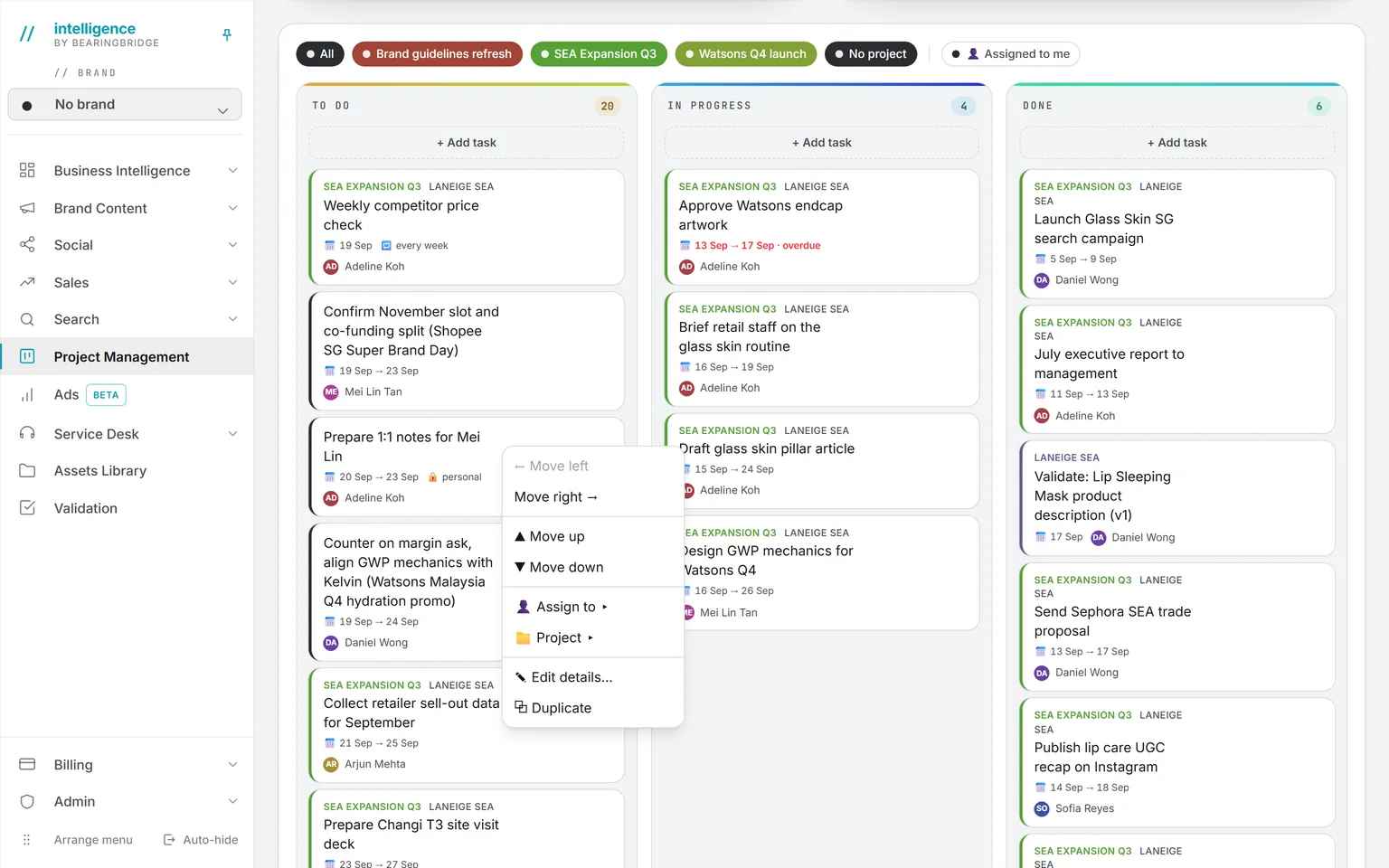
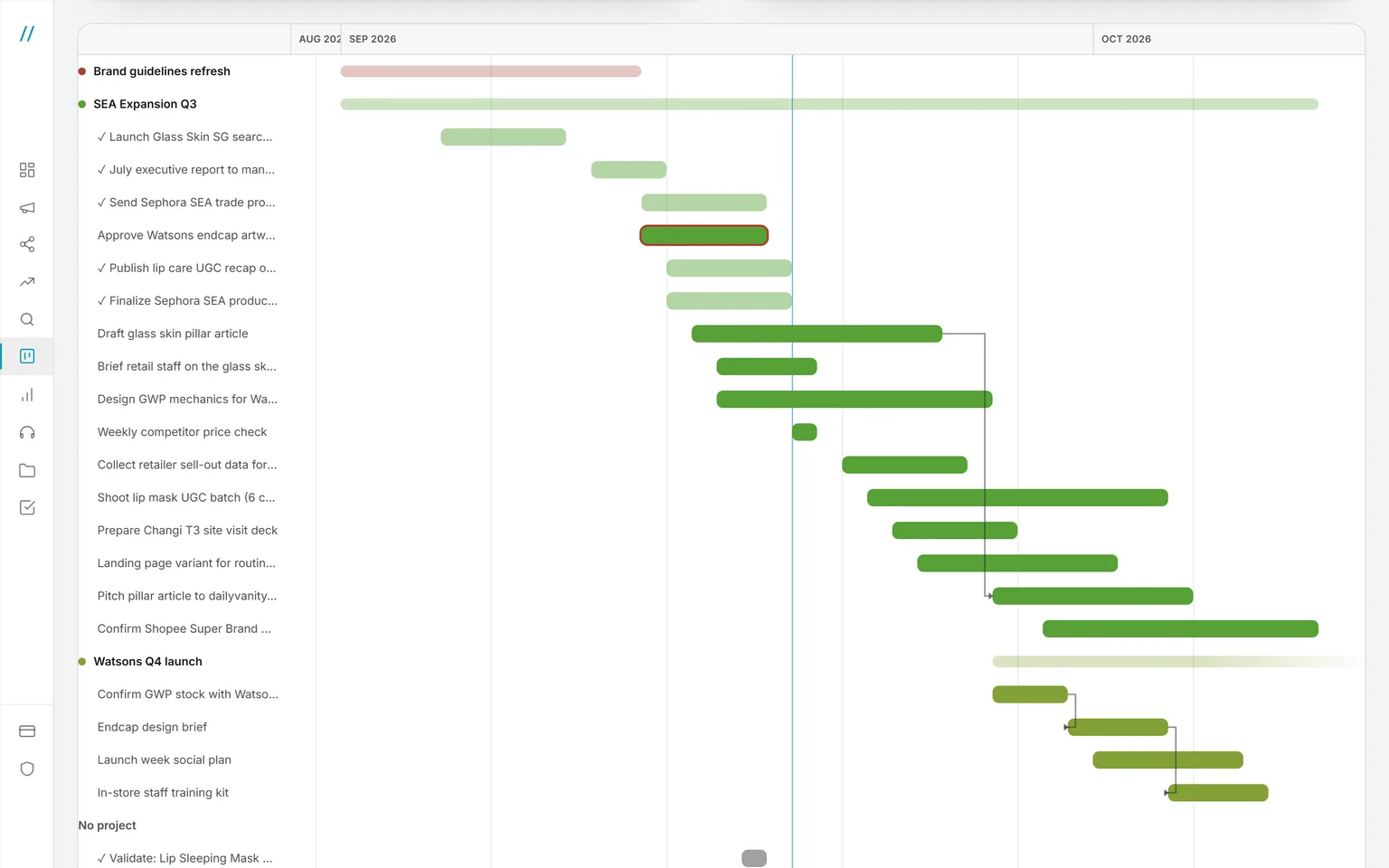
A board and a timeline over the same cards. Projects that only their team can see, with the people and material they need and what those will cost. Tasks of your own that stay yours. And work that arrives by itself: from an agent’s finding, a post to publish, a colleague asking for a decision.
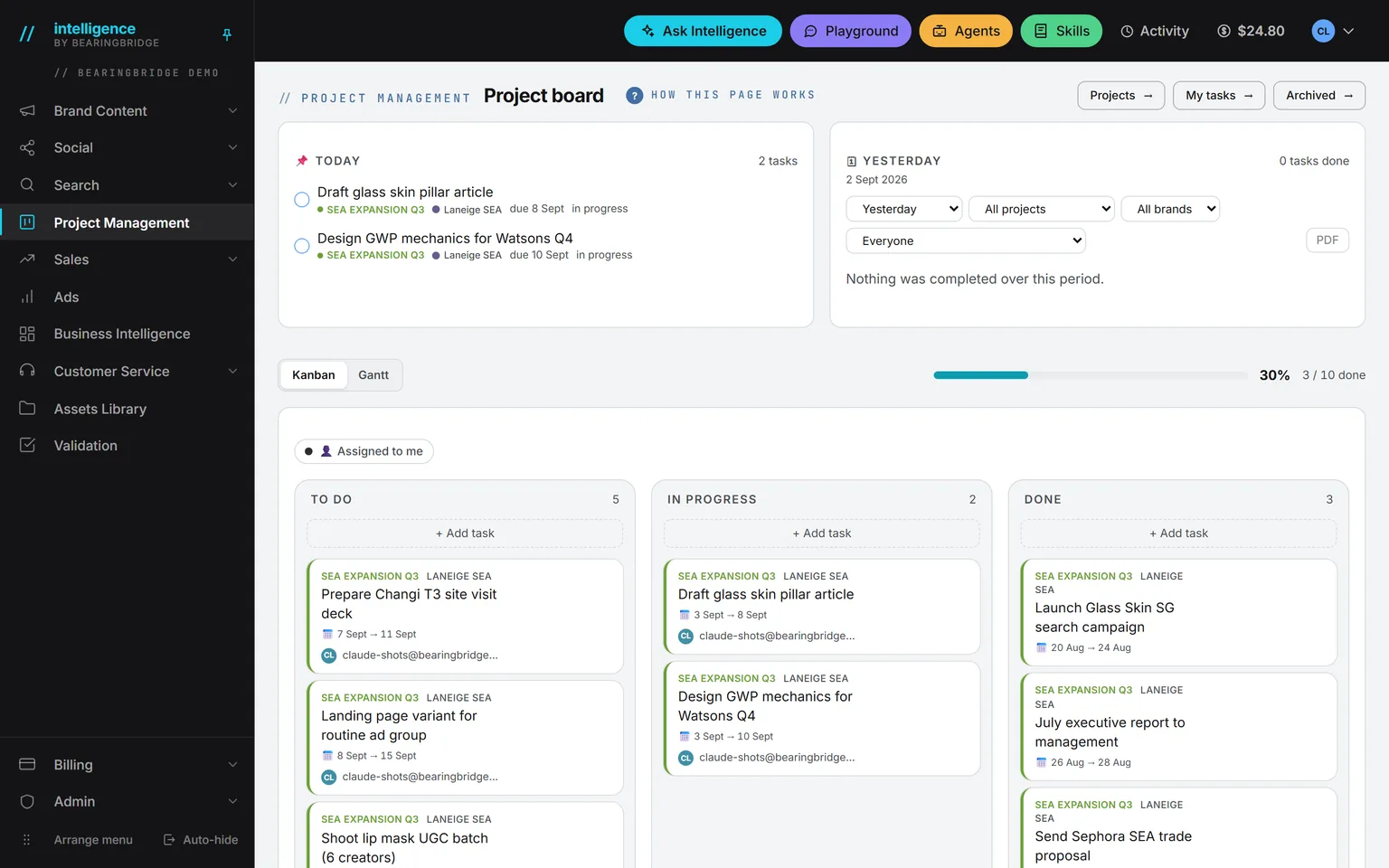
The project board in the demo workspace: the band with To do, In progress, Done and Progress tiles, the Today card and yesterday’s Done card, and the Kanban lanes below with cards tagged by project and brand, one marked personal
Board, projects, your tasksKanban or GanttToday, for youDone, with PDF

Demo workspace. Invented brand and figures.

2views over the same cards
1team per project
4repeat intervals
7reminders at most, then silence
Board and Gantt

One set of cards, four views.

Who sees what

A card is only as public as it needs to be.

A task inside a project belongs to that project’s team, plus the admins who staff it. A task outside any project belongs to just two people: you, and whoever you hand it to, admins included. Only what the product files itself, a deal step, a validation request, a post, a finding, stays open to the whole organization.
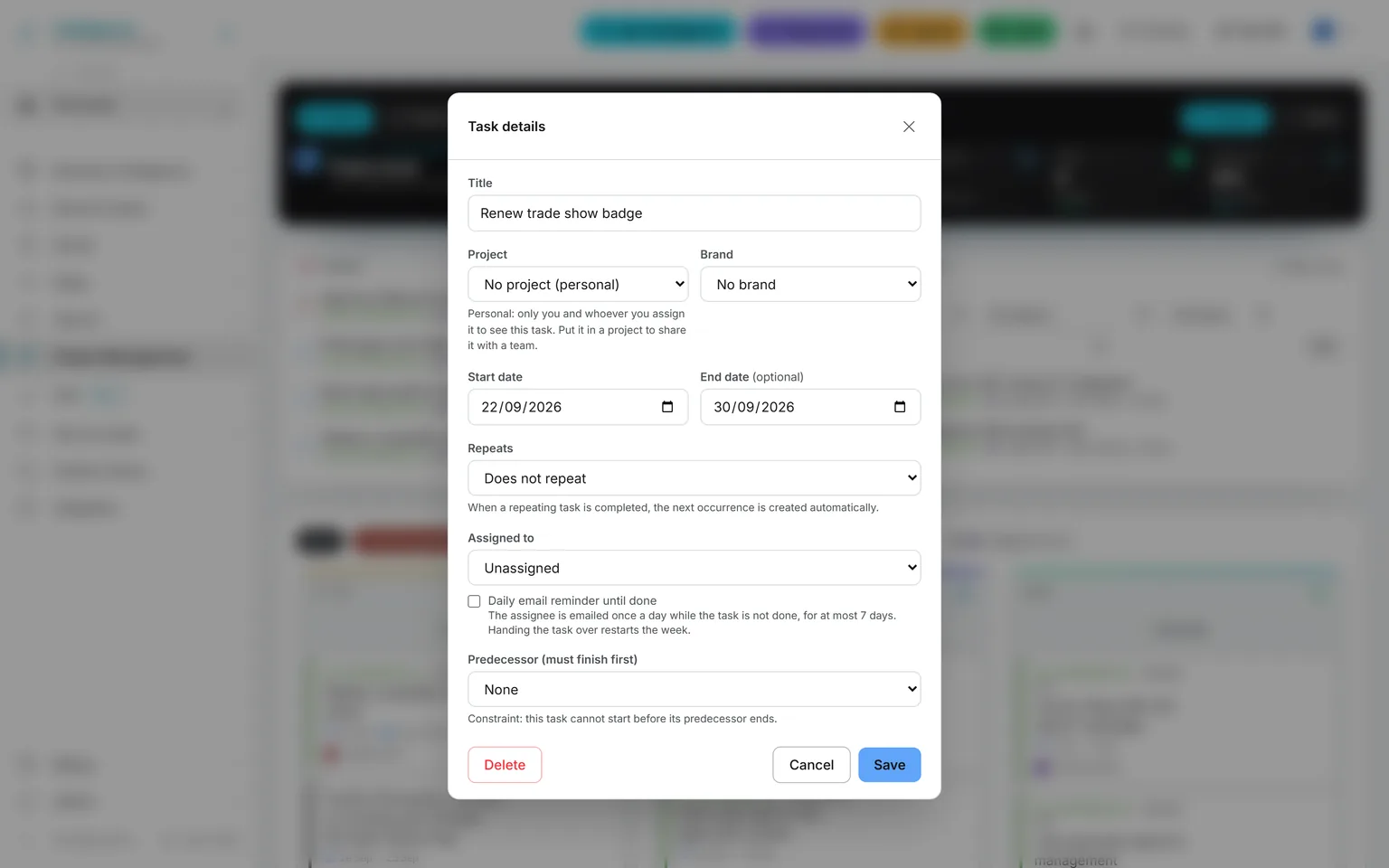
The task editor of a personal task: no project, a note that only its author and assignee see it, repeat, assignee, daily reminder and predecessor

Every editor says who will see the task before you save it. Leave the project field on “No project” and the note is plain: only you and whoever you assign it to.

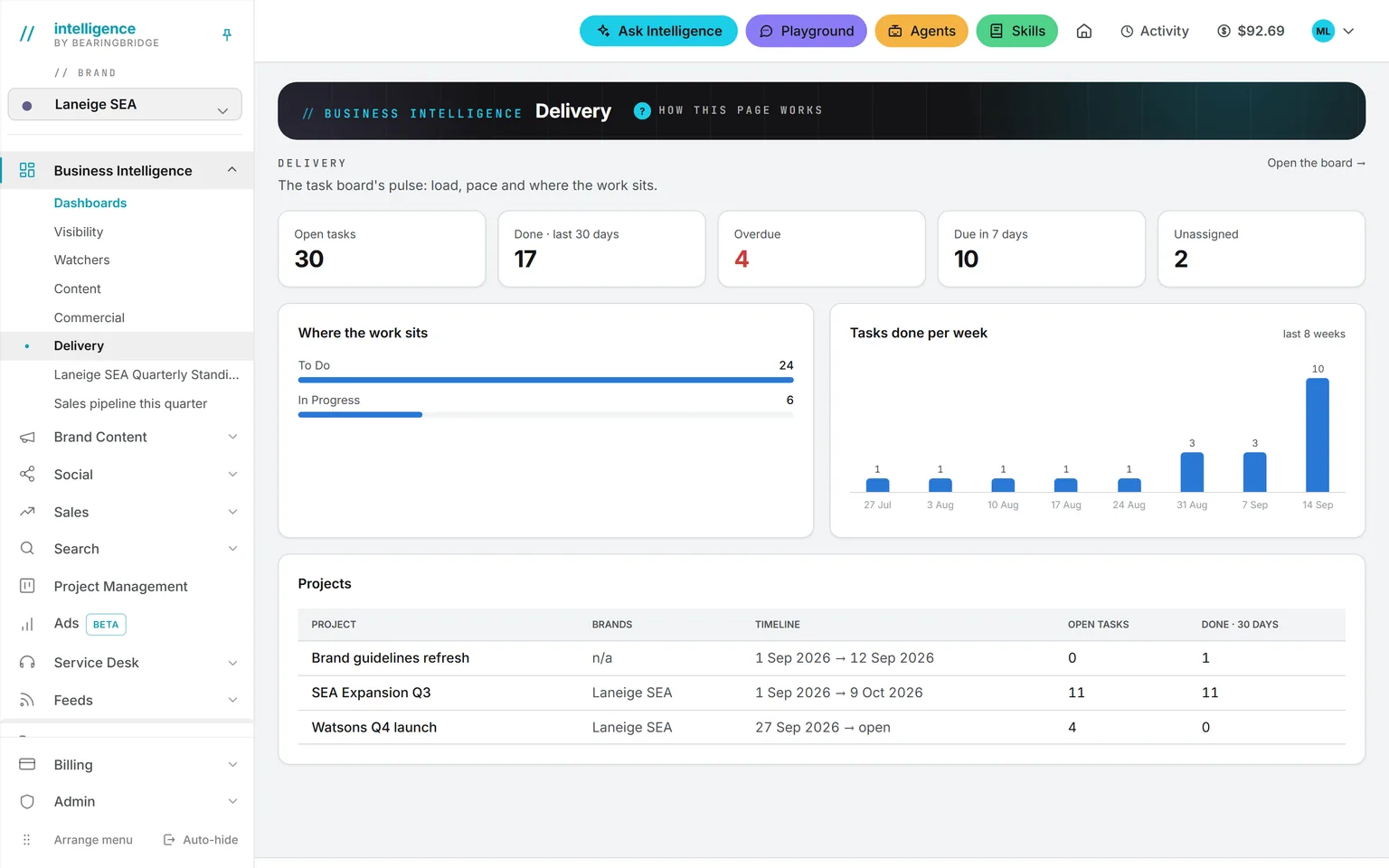
The DONE card, the PDF, the Delivery dashboard and Ask Intelligence all count only what the person looking may see.

Since September 19, 2026: projects carry a team and a planned cost, and a task outside a project is private to its author and assignee.

What a project costs

People and material, priced before the work starts.

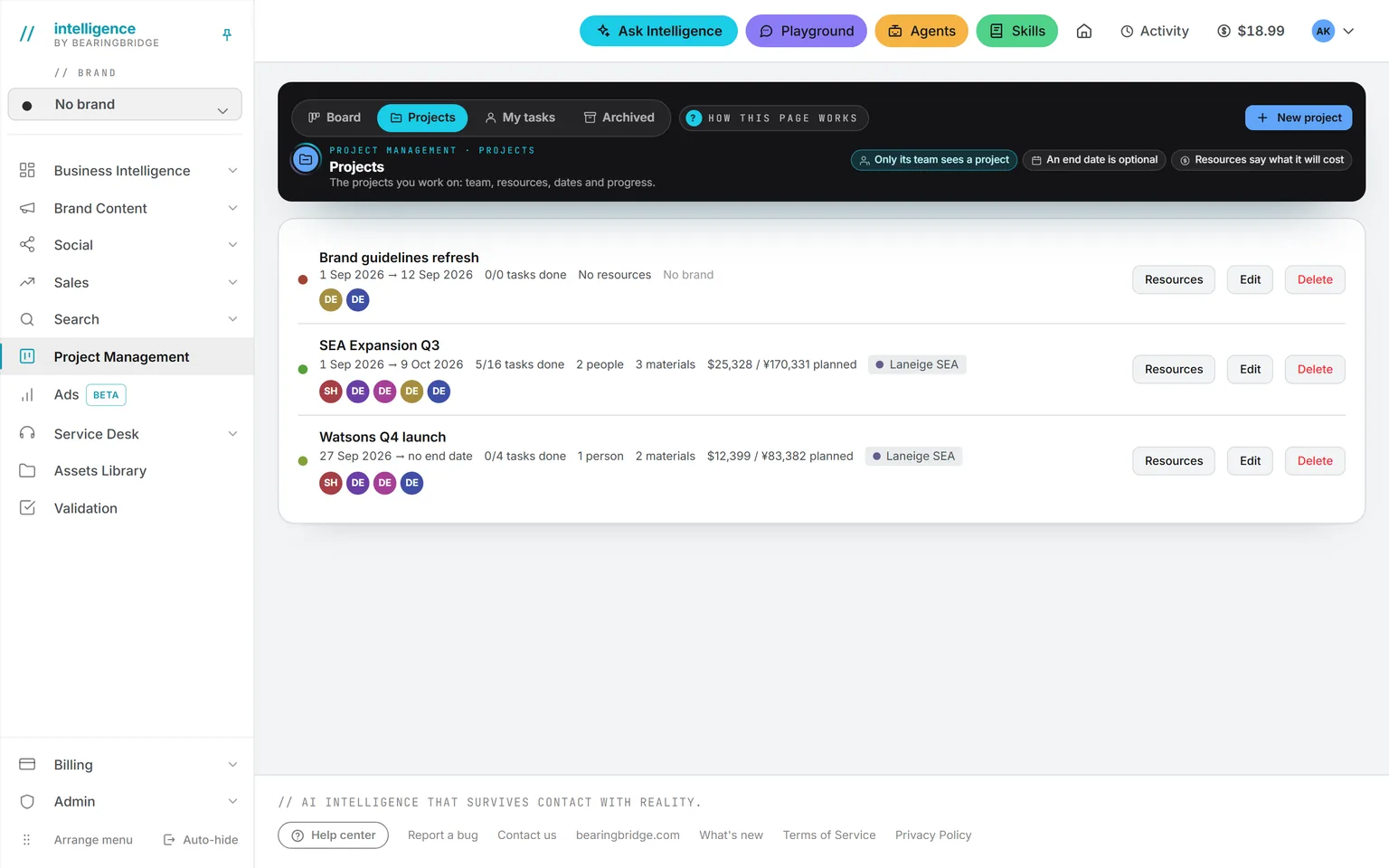
An admin lists what a project needs: people, a colleague or a freelancer simply named, and material, from a studio day to a media budget. Each line carries a unit, a quantity and a cost per unit, in whatever currency it was quoted in. The total reads in your organization’s own currency, at the same exchange rates as your pipeline. Still, it’s the plan, and only the plan: no actual spend is tracked against it yet.
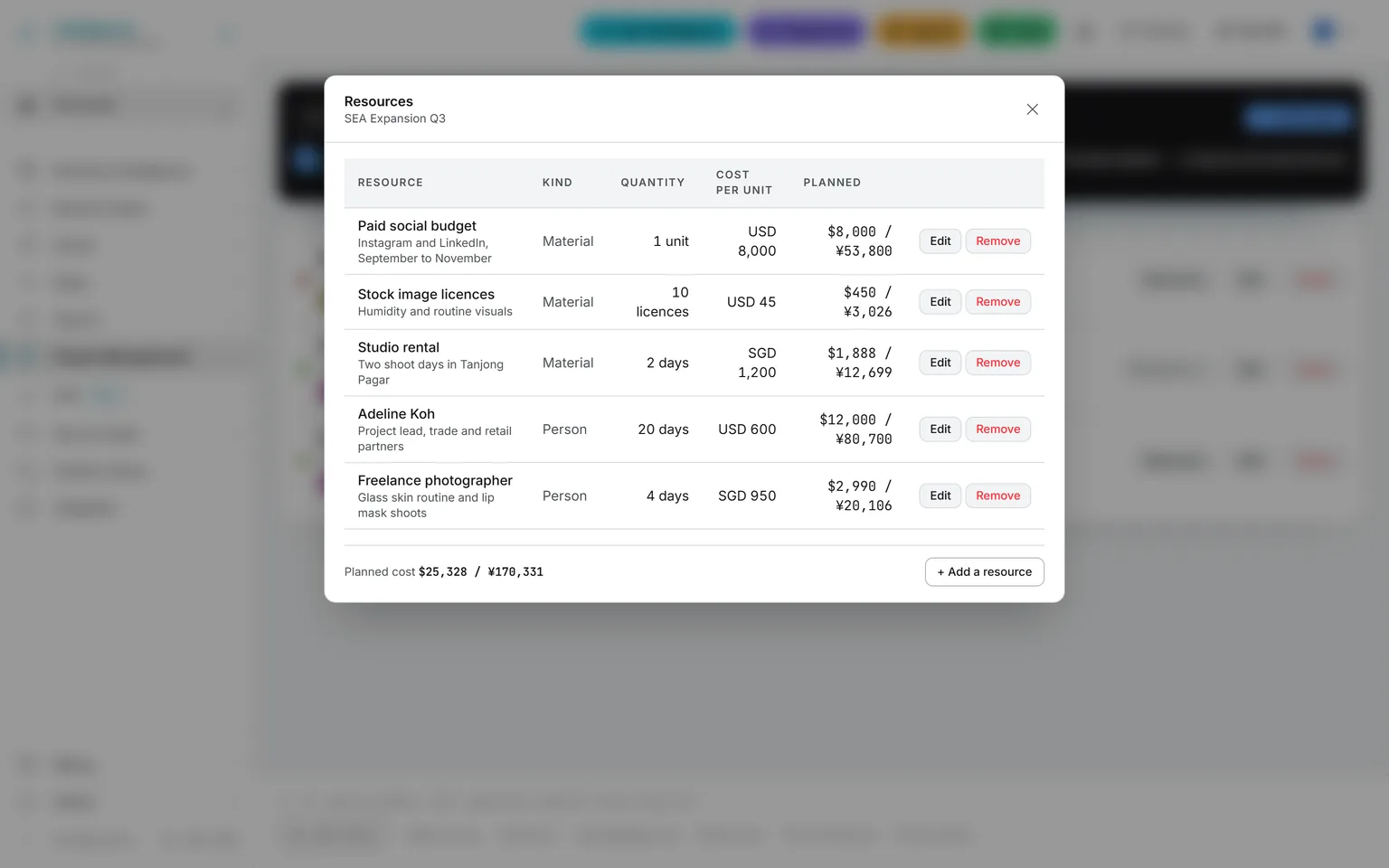
The resources of a project: a project lead, a freelance photographer, a studio rental, a paid social budget and stock image licenses, each with quantity and cost per unit, and the planned cost total in the organization’s currency

Resources. Every line priced, the total converted to your own currency.

The working day

Today for you, done for whoever’s watching.

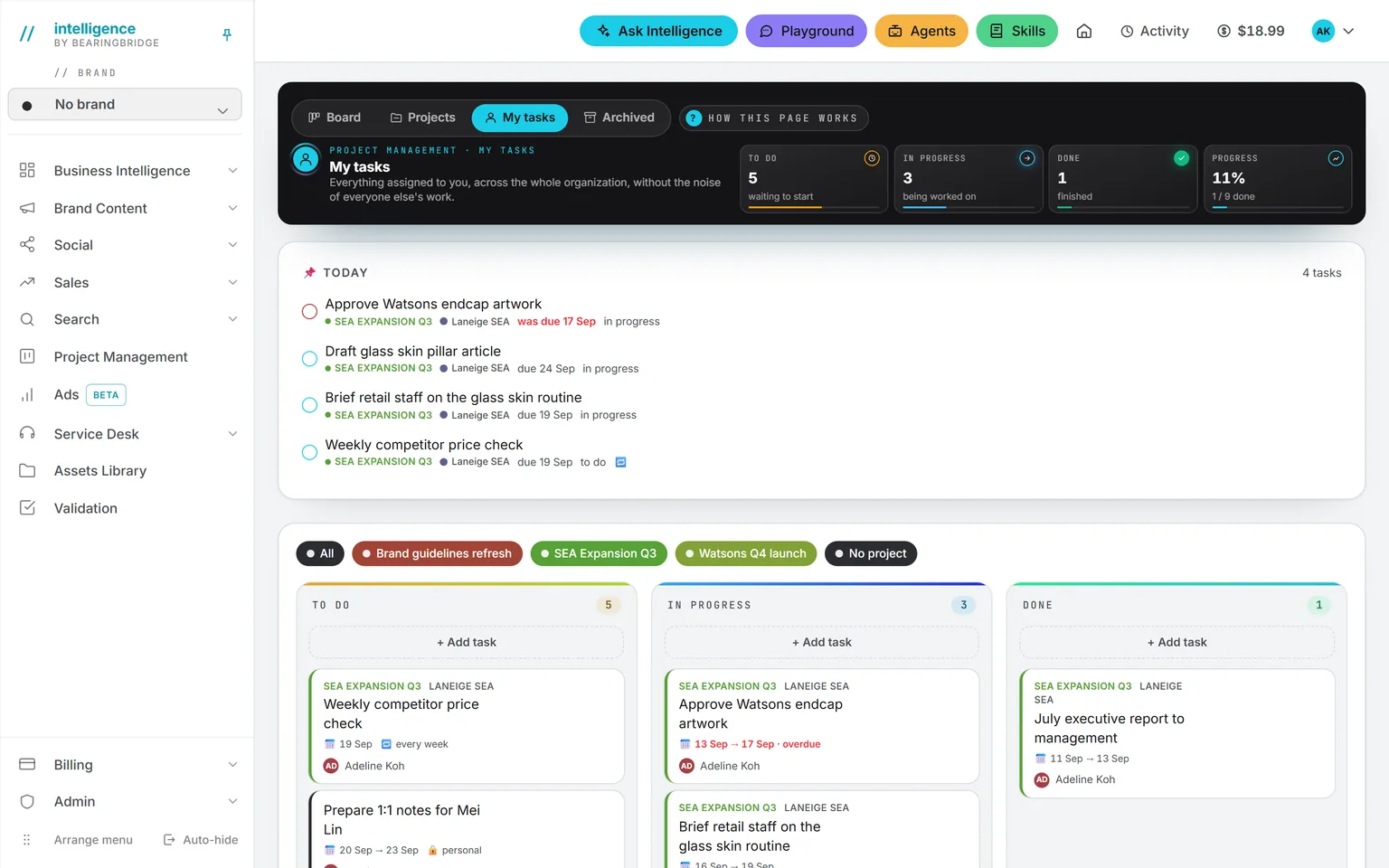
The TODAY card is yours: what you have started, and what is due today, with late work leading in red the moment its date slips by. The DONE card shows what was finished yesterday or over the last complete weeks, filtered by project, brand or person, and exported as a landscape PDF.

A card assigned to you arrives by mail. Its owner can turn on a daily reminder: one a day, counted, seven at most, then it stops. Every date in those mails follows your own time zone and format.
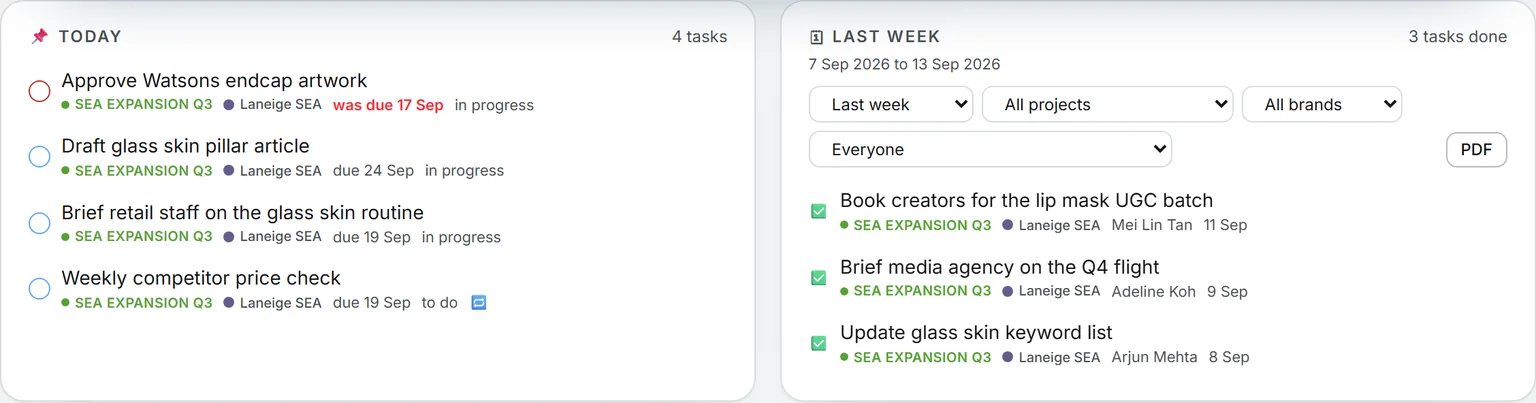
The Today card listing today’s tasks, late ones in red, and the Done card set to the last two weeks, with its period, project, brand and person filters, ten finished tasks and the PDF button
Findings become work

Four ways a card arrives.

From a finding

Create task under a finding puts its suggested action on the board, tagged with the brand and unassigned in To Do. The finding itself is marked as seen.

From a validation request

Send an asset to a colleague and a card appears on their board. A new version reopens it. The decision closes it.

From a post

A publication planned on the Social calendar with an owner becomes a card. Published, it moves to Done by itself.

From you

Add a task and date it, then give it an owner. Put it in a project to share it with the team, or leave it without one to keep it yours.
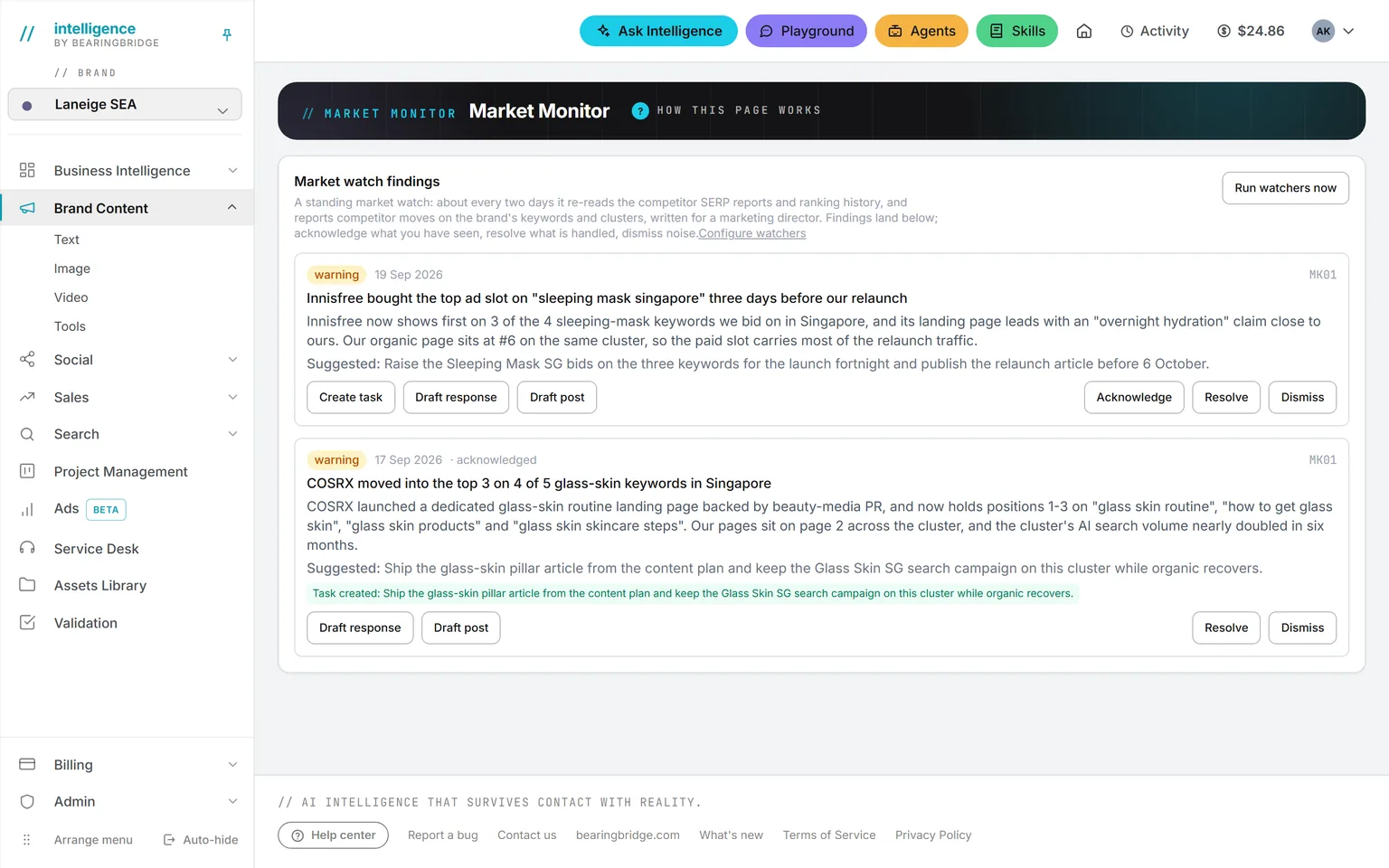
A finding with Create task under it, next to Draft response and Draft post

This is the point of the module. A report nobody opened changes nothing. A card with an owner and a date gets done, or gets asked about at the next stand-up.

Rules

Five rules the board keeps for you.

Only the people on a project’s team, and the admins who staff it, see the project and its tasks. A freelancer on the Watsons Q4 launch never sees a card from SEA Expansion Q3. A task outside any project is its author’s and its assignee’s.

Finish an overdue weekly task and the next one lands strictly after today, keeping its length. Daily, weekly, every two weeks, monthly.

Yesterday, last week, last two weeks, the last four weeks. Weeks run Monday to Sunday, so the running week is never counted early.

The DONE report is computed on the server from the caller’s own scope, so the file can only hold tasks that person could see.

An assignment mail, then, if the owner asks for it, one reminder a day for seven days at most, dressed in the brand when the task carries one. Dates in each mail follow the reader’s own settings.

Works with

Not built yet, said first

  • The Gantt is a timeline with one predecessor per task. No baselines, no critical path, no slip prediction.
  • Planned cost only. No timesheets or capacity planning, and no actual spend set against the plan.
  • Three fixed statuses. No custom columns and no work-in-progress limits.
  • A card holds a title, dates, an owner and its links. No comments, attachments or checklists on the card yet.

The catalog lists every agent as built, partial, or not built. Checked against the product on October 4, 2026.

Usage is paid from a prepaid wallet, with no seat fee. The rates are on the pricing page.

Start

Open the board on Monday and the week is already there.

Switch on Project Management, create the first project and put the team on it, and let the findings, the posts and the validation requests fill the first column.

No subscription. No seat fee. No card needed to open an account.