




By roleThe job: FinanceHeld by: you
How a finance team uses Intelligence.
Intelligence won’t replace your accounting software. It doesn’t issue invoices or file taxes. It gives finance a live view of revenue, costs, and cash, built from the deals the sales team already keeps. Finance also gets full control over what the AI itself spends.
No finance person on staff yet? A founder with a bookkeeper twice a month can still know where cash stands. Keep the deals current, and enter the team and the overheads once. After that, the P&L and the cash forecast follow by themselves. See what it takes over.
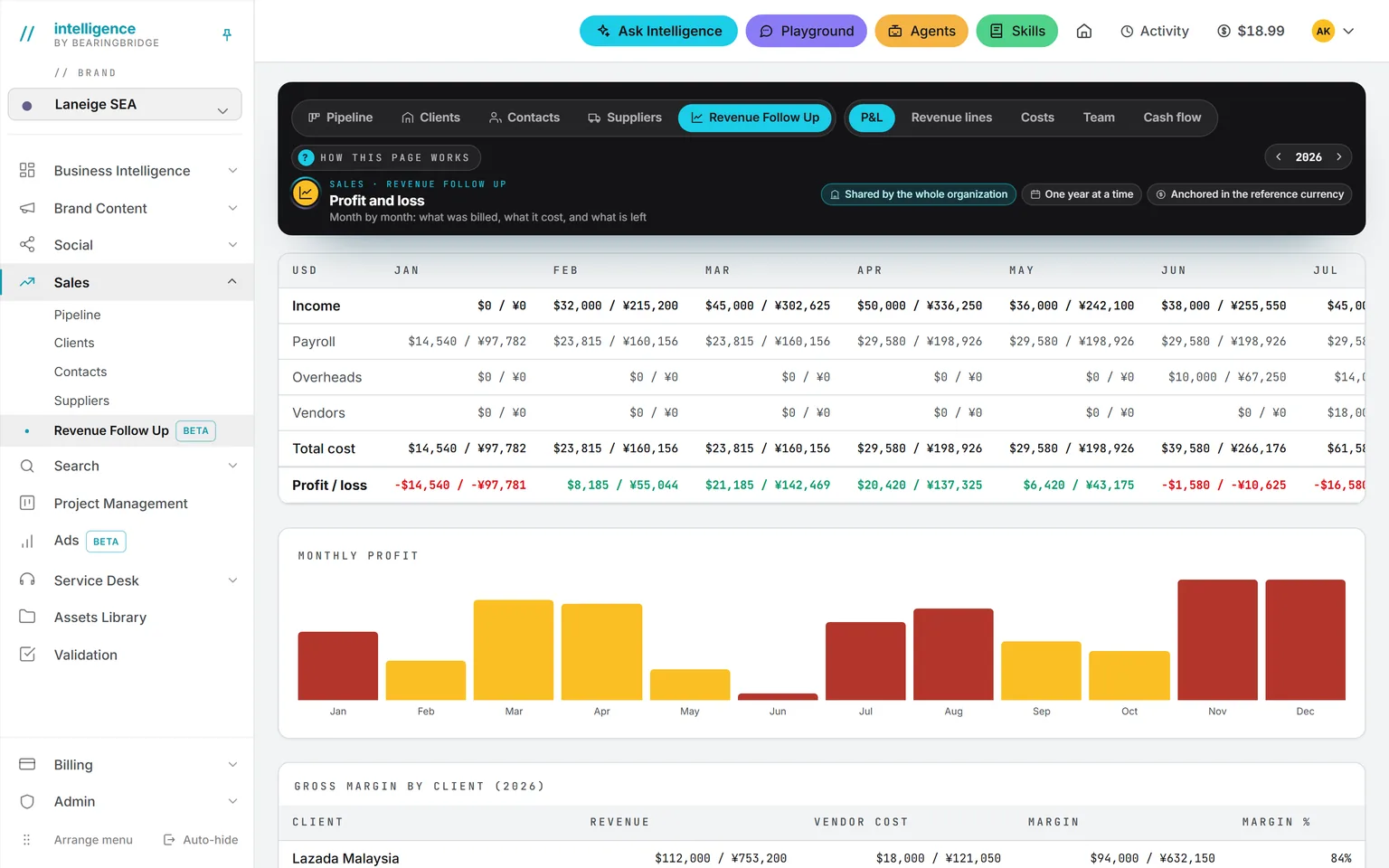
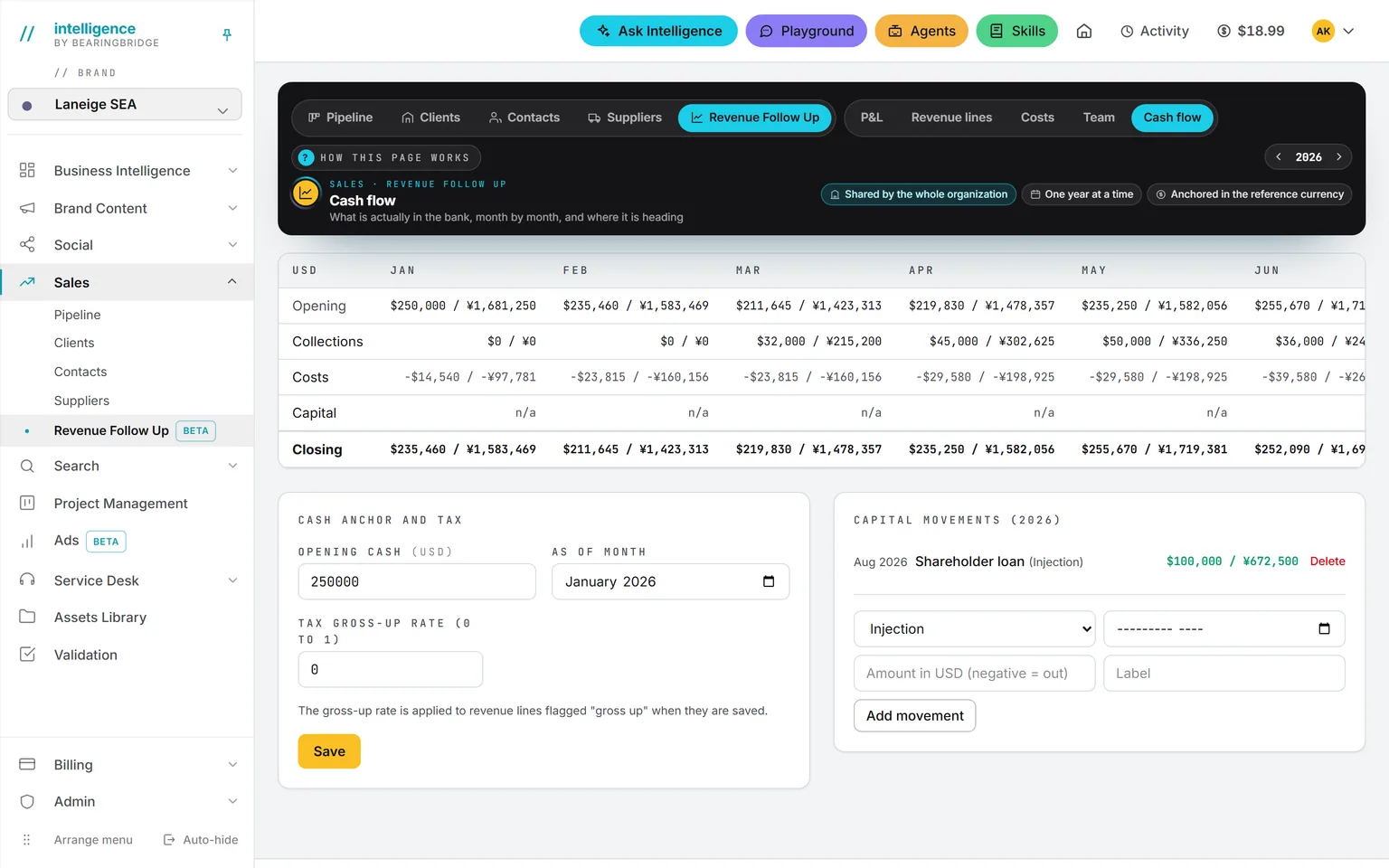
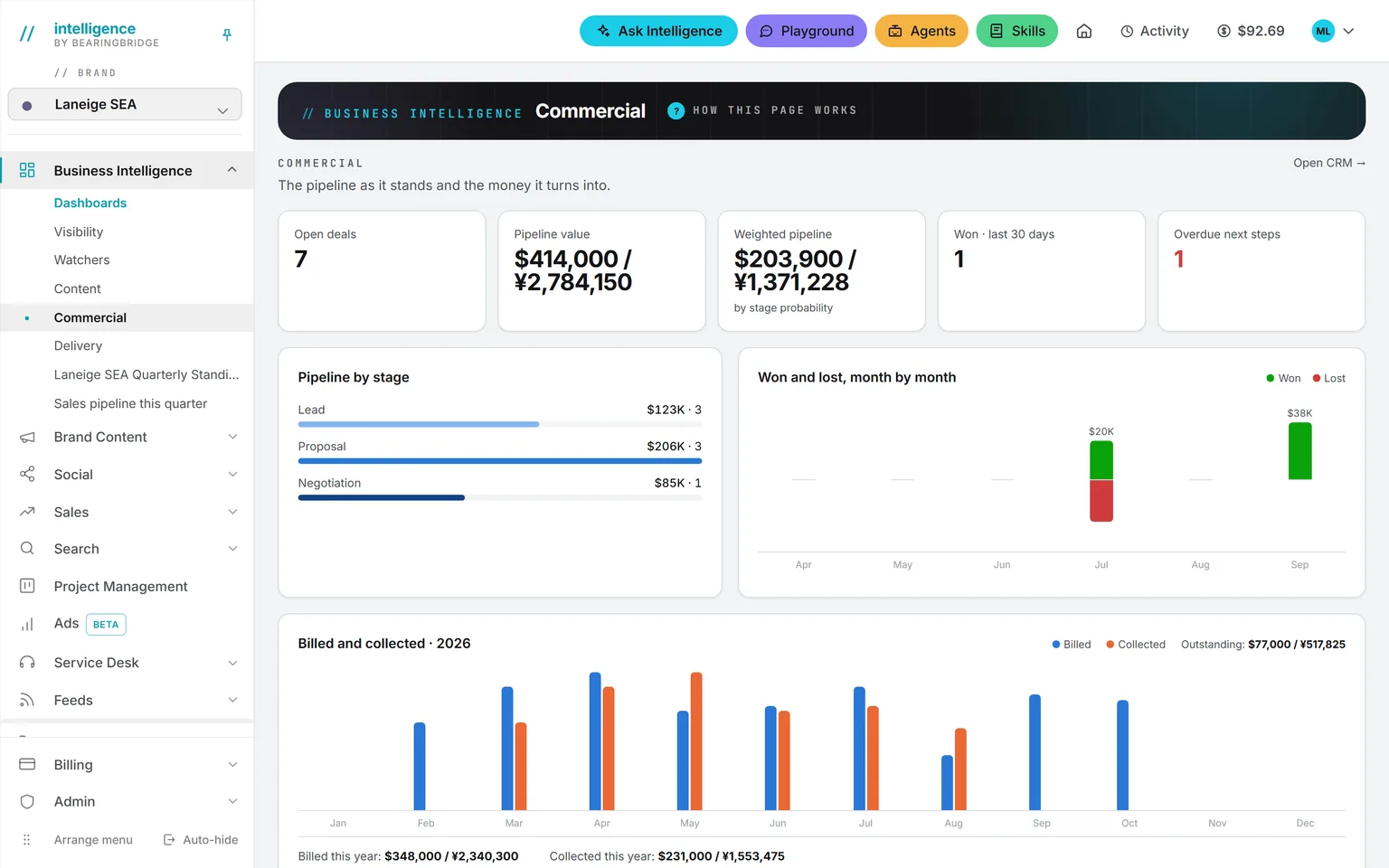
Demo workspace. Invented brand and figures.
The tool you’ll use most: Revenue Follow Up.
Revenue Follow Up sits inside the Sales module. Only the people you give Revenue access to can open it. It has five parts.
A won deal becomes billing lines, or you type them by hand. Each line is pending, billed, or paid, and that status is computed, never typed.
See the page →Each person’s monthly cost, from a start date to an end date: base, social charges, and medical. Freelancers are counted their own way.
See the page →Overheads that repeat until the month you choose, and you can still edit any single month. Vendor payables, meaning what you owe vendors, sit beside them.
See the page →Short for profit and loss. Pick a year and you get 12 columns. Income is on an accrual basis: it counts when it’s earned, not when the cash arrives. Below that come payroll, overheads, vendor costs, profit or loss, and gross margin per client.
See the page →Opening cash, collections, costs, capital movements, and closing cash. Past months show actuals, and the coming months are the forecast.
See the page →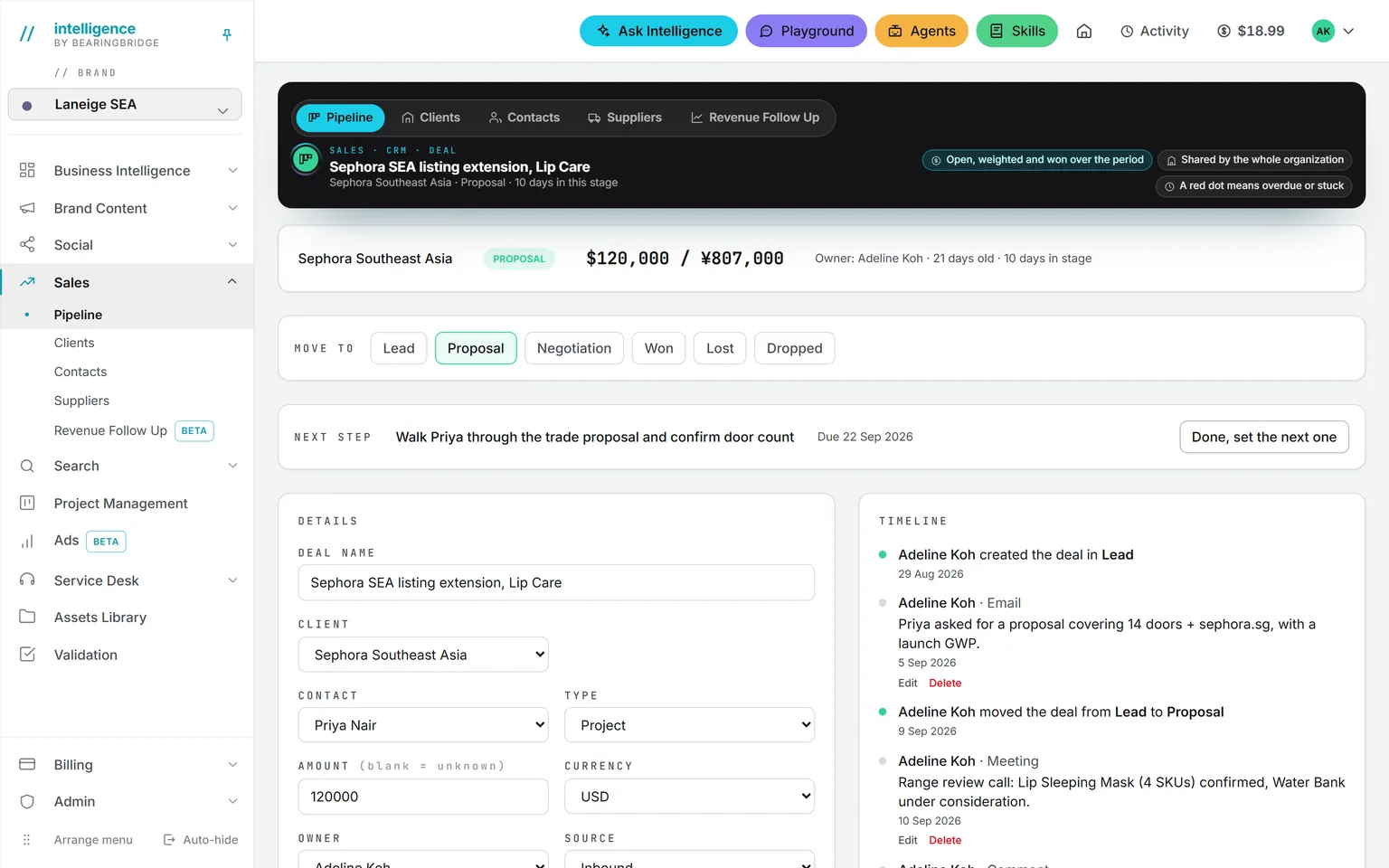
Billing linesHover to pause
No total is stored. Every figure is computed from the lines when you open the page, so the P&L can’t disagree with the deals underneath it. If you open only one part every week, make it Cash.
Two questions finance gets every month.
Now showingIn January
In January
Will we make payroll in March?
Open the cash page. It chains opening cash, expected collections, and costs, month by month. If March closes thin, you see it in January.
Then go to the billing lines and chase what is billed but not paid.
At month end
Which client makes us money?
The answer is on the P&L, under gross margin per client. A client with large revenue and heavy vendor costs may sit at the bottom.
Questions to type into Ask Intelligence.
Some days it’s faster to ask
What was billed and not yet collected, by client?
Ask Intelligence reads revenue data only when your role can see it. The Commercial dashboard charts billed against collected, and you can build your own dashboard from a sentence. You can also connect a Google Sheet or a read-only REST API, so your own figures answer beside the platform’s.
What the AI costs, and how you cap it.
That’s your company’s money. Now for the platform’s own bill. There are no seats to count. Accounts are free at any headcount. Money goes into a prepaid wallet, from $10 to $1,000 at a time, by card, Alipay, or WeChat Pay. You get a Stripe invoice for each purchase, and the balance never expires. Then come the limits.
A prepaid balance
From $10 to $1,000 at a time. It never expires.
A daily allowance
It starts at zero until an administrator sets it.
A monthly cap
For the organization.
Two budgets
Each agent has a weekly budget and a monthly budget.
Who spent what
Every run is listed with who started it, when, on which model, and the exact cost.
Image and video show their price before the run. For everything else, the cost appears the moment the run ends, and that number is the number charged. Retries and failed runs aren’t billed. Storage is a separate line, charged daily, and it shows under Usage in Billing. Each run is attributed to the organization, the brand, the user, and the agent, so you can charge each brand for what it used. The model is laid out on pricing.
If you work in more than one currency.
Companies that bill in one currency can skip this. Each amount keeps its own currency and its value in your reference currency. Open and unpaid rows follow the rate table, while closed and paid rows never move again.
You can also print a second currency next to every figure. Five are supported: US dollar, euro, yuan, Hong Kong dollar, and Australian dollar.
If nobody holds this job.
Vacancy
- Position
- Finance
- Held by
- Nobody yet
- Covered by
- Intelligence
- Works with
- Your bookkeeper
The bookkeeper keeps the books. You open the platform, any morning, to see whether the next three months hold. The payroll question above is a founder’s question too.
The platform takes
- The P&L, computed from the lines each time you open it.
- The cash forecast, month by month.
- The ledger of what the AI spent, run by run.
A person keeps
- Keeping the deals current.
- Entering the team and the overheads, once.
- The books, with the bookkeeper.
- The invoices, from your accounting tool.
Your first week.
0of 5 done
Tick a step when it’s done. Your ticks stay in this browser.
By Friday, the P&L and the cash page have real numbers in them.
What it doesn’t do.
Read these before you set anything up.
There’s no customer invoicing. Billing lines track what is due and paid, and the invoice comes from your accounting tool.
There’s no import of an existing pipeline yet.
A project carries a planned cost, with no actual spend set against it and no timesheets.
A month-end close agent, a supplier document matching agent, and a sales forecast agent exist in the catalog as built to order, not as product features.
Checked against the product on September 20, 2026. The catalog lists every agent as built, partial, or not built. Usage is paid from a prepaid wallet, with no seat fee, and the rates are on the pricing page.
By Friday, the P&L and the cash page have real numbers in them.
Open an account, enter the team and the overheads once, and turn each won deal into billing lines.
No subscription. No seat fee. No card needed to open an account.